2026/04/09 - 25일차 | dplyr 패키지, 시각화
[ dplyr 패키지 ]
- SQL처럼 구조화 된 명령어 작성 가능( %>% 을 사용하여 명령어의 순차적 실행 전달)
- 다양한 데이터 처리 함수 제공(lag, lead, dense_rank, select, between)
library(dplyr)
emp <- read.csv('emp.csv')

dplyr::lag(x, n = 1)
1. %>% 에서 함수 사용
emp %>%
  mutate(LAG_SAL = lag(SAL), LEAD_SAL = lead(SAL)) %>%
  filter(between(SAL, 1000, 3000))
2. 함수 단독 사용
1) between 함수
emp[between(emp$SAL, 1000, 3000), ]2) lag, lead 함수
lag(emp$SAL)
lead(emp$SAL)
3) 원하는 컬럼 선택
emp[,c('EMPNO', 'ENAME')]
select(emp, c(EMPNO, ENAME))
select(emp, -HIREDATE)
select(emp, JOB:DEPTNO)
4) 원하는 행 선택
emp[emp$DEPTNO == 10, ]
filter(emp, DEPTNO == 10)         # dplyr 패키지 함수
subset(emp, DEPTNO == 10)         # base 함수
[ 시각화 ]
- 기본 시각화 함수(plot, lines, barplot, ...) + 외부패키지 함수(ggplot2)
1. plot
- 점, 선 그래프(기본)
- 데이터프레임의 교차 산점도 출력
- 다양한 분석 결과 시각화
plot(x,
     y = NULL,
     type = "p",              # 그래프 타입(p:산점도, l:선그래프, o:선+점그래프)
     xlim = NULL,             # x축 범위
     ylim = NULL,             # y축 범위
     log = "",                # log 출력
     main = NULL,             # 메인제목
     sub = NULL,              # 서브제목
     xlab = NULL,             # x축 이름
     ylab = NULL,             # y축 이름
     ann = par("ann"),        # 축 제목 출력 여부
     axes = TRUE,             # 눈금 출력 여부(F로 설정하면 그래프 테두리 모두 지워짐)
     cex = ,                  # 점 크기
     pch = ,                  # 점 모양
     lwd = ,                  # 라인 두께
     col = ,                  # 색
     lty = 1,                 # 라인 스타일(1:실선, 2:점선)
     las = 0)                 # 눈금회전(0:수직, 1:수평)
기본 plot 출력(산점도)
v1 <- c(1,4,10,33,23,12,50,38,33,25)
v1 <- sort(v1)
v2 <- c(10,2,30,45,20,33,10,34,23,50)
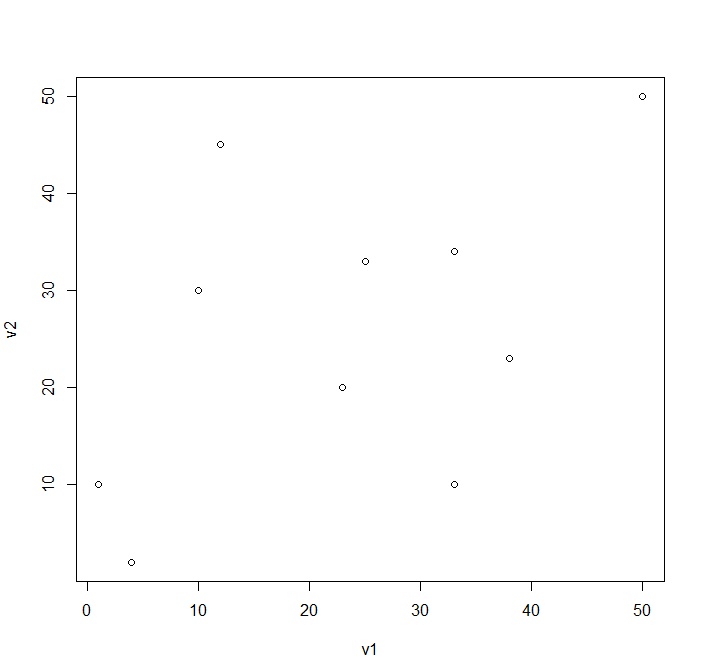
plot(v1, v2)
plot(v1, v2) 결과 그래프
새로운 figure 출력
dev.new()
plot(v1, v2)                                           # 점그래프 출력
plot(v1, v2, type = 'l')                               # 선그래프 출력
plot(v1, v2, type = 'o')                               # 선과 점 그래프 출력
plot(v1, v2, type = 'o', lty = 2)                      # 점선 출력
plot(v1, v2, type = 'o', lty = 2, pch = 10)            # 점 모양 변경
plot(v1, v2, type = 'o', lty = 2, pch = 8, cex = 2)    # 점 크기 변경
plot(v1, v2, type = 'o', lty = 2, pch = 8, lwd = 5)    # 선 두께 변경
plot(v1, v2, type = 'o', lty = 2, ylim = c(-10,80))    # y축 범위
plot(v1, v2, type = 'o', lty = 2, ylim = c(-10,80))    # y축 범위
plot(v1, v2, type = 'o', lty = 2, main = '선그래프',
     xlab = 'x축', ylab = 'y축', las = 1)              # 눈금 회전(수평)
plot(v1, v2, ann = F)                                  # x축, y축 이름 지우기
plot(v1, v2, axes = F)                                 # 눈금 지우기
plot(v1, v2, type = 'o', lty = 2, col = '#FF69B4')
[ plot 함수를 사용한 데이터프레임의 교차 산점도 출력]
plot(iris[,-5],
     col = iris$Species)   # factor변수는 level 순서대로 1,2,3의 값을 가짐
                           # col옵션으로 1:black, 2:red, 3:green으로 해석됨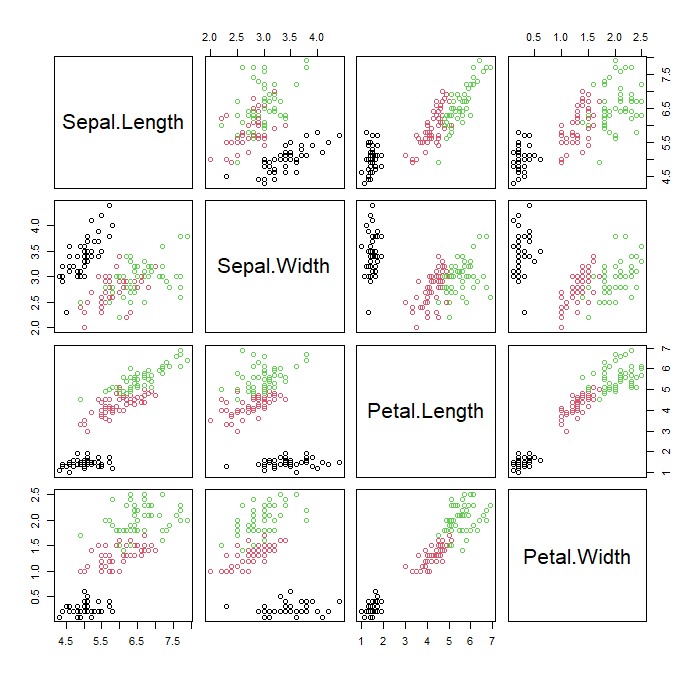
* 사용자 정의 팔레트 생성
p1 <- ifelse(iris$Species == 'setosa', '#FF69B4',
             ifelse(iris$Species == 'versicolor', '#00CED1', '#FF4500'))
plot(iris[,-5], col = p1)
* 외부 패키지 팔레트 사용
install.packages('colorspace')
library(colorspace)
hcl_palettes()                               # 팔레트 이름 확인
hcl_palettes(plot=T)                         # 팔레트 전체 색 확인
hcl_palettes('Sequential', plot=T)           # 특정 팔레트 그룹 색 확인

p2 <- colorspace::sequential_hcl(3,          # 색 개수
                                'plasma')    # 팔레트 이름
더보기
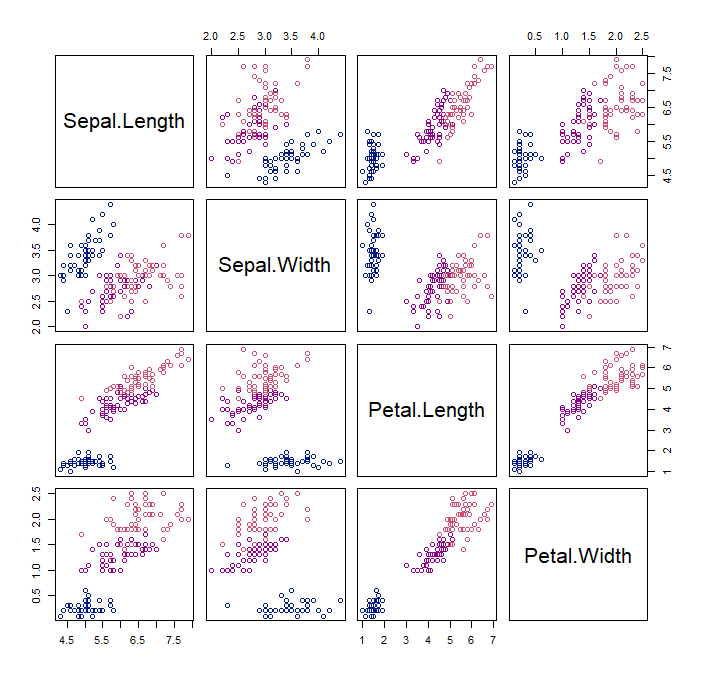
p1 <- ifelse(iris$Species == 'setosa', p2[1],
             ifelse(iris$Species == 'versicolor', p2[2], p2[3]))
plot(iris[,-5], col = p1)
[ 여러 선그래프 출력 ]
- plot 함수는 데이터프레임 전달 시 교차산점도 출력 -> 비교 선그래프 출력 불가
- 하나씩 선그래프 출력 or 외부패키지 사용(ggplot2)
- plot으로 메인설정 -> lines로 새 선그래프 추가
1. 눈금 변경
axis(side,             # 방향(1:x축, 2:y축)
     at = ,            # 눈금좌표
     labels = )        # 눈금이름
2. 범례 설정
legend(x,              # x축 좌표("bottomright", "bottom", "bottomleft", "left",
                       #          "topleft", "top", "topright", "right", "center")
       y,              # y축 좌표
       legend = ,      # 범례 이름(각 그래프 설명)
       lty = ,         # 선스타일(실제 선그래프와 동일하게 적용)
       cex = ,         # 글자크기
       fill = ,        # 막대그래프용 색 전달
       title,          # 제목
       title.adj,      # 제목 좌우 위치
       title.col = ,
       title.cex = ,
       title.font = ,
       box.lwd = ,     # 테두리 굵기
       box.col = ,
       box.lty = ,
       bty = 'n',      # 테두리 생략
       bg = )          # 배경색
3. 제목 설정
title(main = ,      # 메인제목
      sub = ,       # 서브제목
      xlab = ,
      ylab = ,
      col.main = ,  # 메인색
      col.lab,      # x축, y축 색
      col.sub,      # 서브색
      font.main,
      font.lab,
      font.sub,
      cex.main,
      cex.lab,
      cex.sub)
4. 여백에 텍스트 표시
mtext("y축 좌표",
      side = 2,         # 위치(1:아래, 2:왼, 3:위, 4:오른쪽)
      line = 1,         # 라인에서 떨어짐 정도
      las = 1,          # 회전(0:수직, 1:수평)
      at = 12000)       # 위치(실제 눈금)
5. 텍스트 전달
text(x,            # x 위치
     y = NULL,     # y 위치
     labels = ,    # 텍스트
     pos = ,       # 기준점 대비 위치(1:아래, 2:왼, 3:위, 4:오른)
     offset = 0.5, # pos 거리 조절
     xpd = F,      # 그래프 밖 출력 여부
     srt = 0       # 글자회전 각도
     ...)
6. 여백 조절
par('mar')                      # 현재 여백 확인(순서대로 하, 좌, 상, 우)
par(mar = c(6, 4.1, 4.1, 2.1))  # 현재 여백 변경
7. 현재 그래프 범위 확인
par('usr') # 좌, 우, 상, 하 순서
8. 파라미터 변경
par(bg = '#E3F3E9')
par(family = '')
9. 폰트 등록
1) 폰트 다운로드: https://fonts.google.com
2) 다운로드 폰트 R 등록
windowsFonts(
  gamja = windowsFont("Gamja Flower")     # 다운받은 폰트이름
)
par(family = 'gamja')                     # 폰트설정
예제1)
더보기
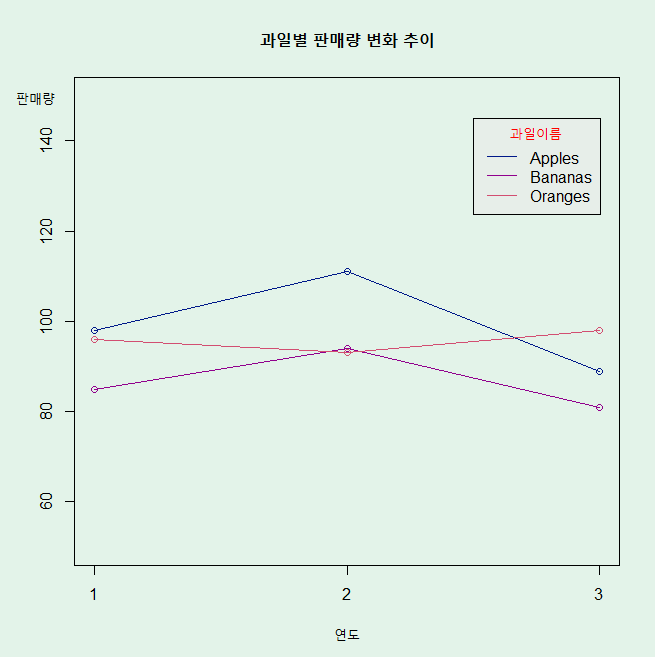
Fruits 데이터를 사용하여 과일별 연도별 sales의 증감추이 선그래프 출력
library(googleVis)
Fruits2 <- dcast(Fruits, Year ~ Fruit, value.var = 'Sales')
rownames(Fruits2) <- Fruits2$Year
Fruits2$Year <- NULL

dev.new()
par(bg = '#E3F3E9')
plot(Fruits2$Apples, type = 'o', col = p2[1], ylim = c(50, 150), axes = F,
     main = '과일별 판매량 변화 추이', xlab = '연도', ylab = '')
lines(Fruits2$Bananas, type = 'o', col = p2[2])
lines(Fruits2$Oranges, type = 'o', col = p2[3])

# 눈금 표시
axis(1, at = c(1,2,3), labels = rownames(Fruits2))
axis(2)
box()

# 범례 표시
# legend('topright', legend = names(Fruits2), lty = 1, col = p2)
legend(2.5, 145, legend = names(Fruits2), lty = 1, col = p2,
       title = '과일이름', title.col = 'red', bg = '#E7EEE9')

# y축 이름 설정
mtext("판매량",
      side = 2,         # 위치(1:아래, 2:왼, 3:위, 4:오른쪽)
      line = 1,         # 라인에서 떨어짐 정도
      las = 1,          # 회전(0:수직, 1:수평)
      at = 150)       # 위치(실제 눈금)
예제2)
더보기

승차 총합 기준으로 top5 역 확인, 해당역의 시간대별 승차 변화 시각화
sub <- read.csv('subway2.csv', fileEncoding = 'cp949', skip = 1)
library(stringr)
sub2 <- dplyr::filter(sub, 구분 == '승차')
sub2$구분 <- NULL
sub2 <- melt(sub2, id.vars = '전체', variable.name = '시간대', value.name = '승차수')
sub2$시간대 <- as.numeric(str_sub(sub2$시간대,2,3))

# 역별 승차 총합
sub3 <- ddply(sub2, .(전체), summarise, 승차총합 = sum(승차수)) |> arrange(-승차총합)

# top 5 확인
sname <- sub3[1:5,'전체']
total <- filter(sub2, 전체 %in% sname)

# wide data로 변경
total <- dcast(total, 시간대 ~ 전체, value.var = '승차수')
rownames(total) <- total$시간대
total$시간대 <- NULL

# 시각화
my_col1 <- c('#FF6666', '#66FFB2', '#3399FF', '#CC99FF', '#FF007F')

windowsFonts(
  nanumpen = windowsFont("Nanum Pen")    # 다운받은 폰트이름(설치시 이름 확인)
)

dev.new()
par(bg = '#F8F9F8')
par(family = 'nanumpen')
plot(total$`강 남`/1000, type = 'o', lty = 2, col = my_col1[1],
     ylim = c(0,400), axes = F,
     xlab = '시간대', ylab = '')
lines(total$`강 변`/1000, type = 'o', lty = 2, col = my_col1[2])
lines(total$`삼 성`/1000, type = 'o', lty = 2, col = my_col1[3])
lines(total$`신 림`/1000, type = 'o', lty = 2, col = my_col1[4])
lines(total$`잠 실`/1000, type = 'o', lty = 2, col = my_col1[5])

axis(1, at = 1:nrow(total), rownames(total))
axis(2)
box()
title('역별 시간대별 승차 추이', col.main = 'red', cex.main = 2)
mtext('시간대(천)', side = 2, las = 1, at = 450)
legend(17, 400, legend = names(total), col = my_col1,
       lty = 2, title = '역이름', bg = '#EEF2EF')
25일차 실습 문제 풀이
링크첨부예정


